


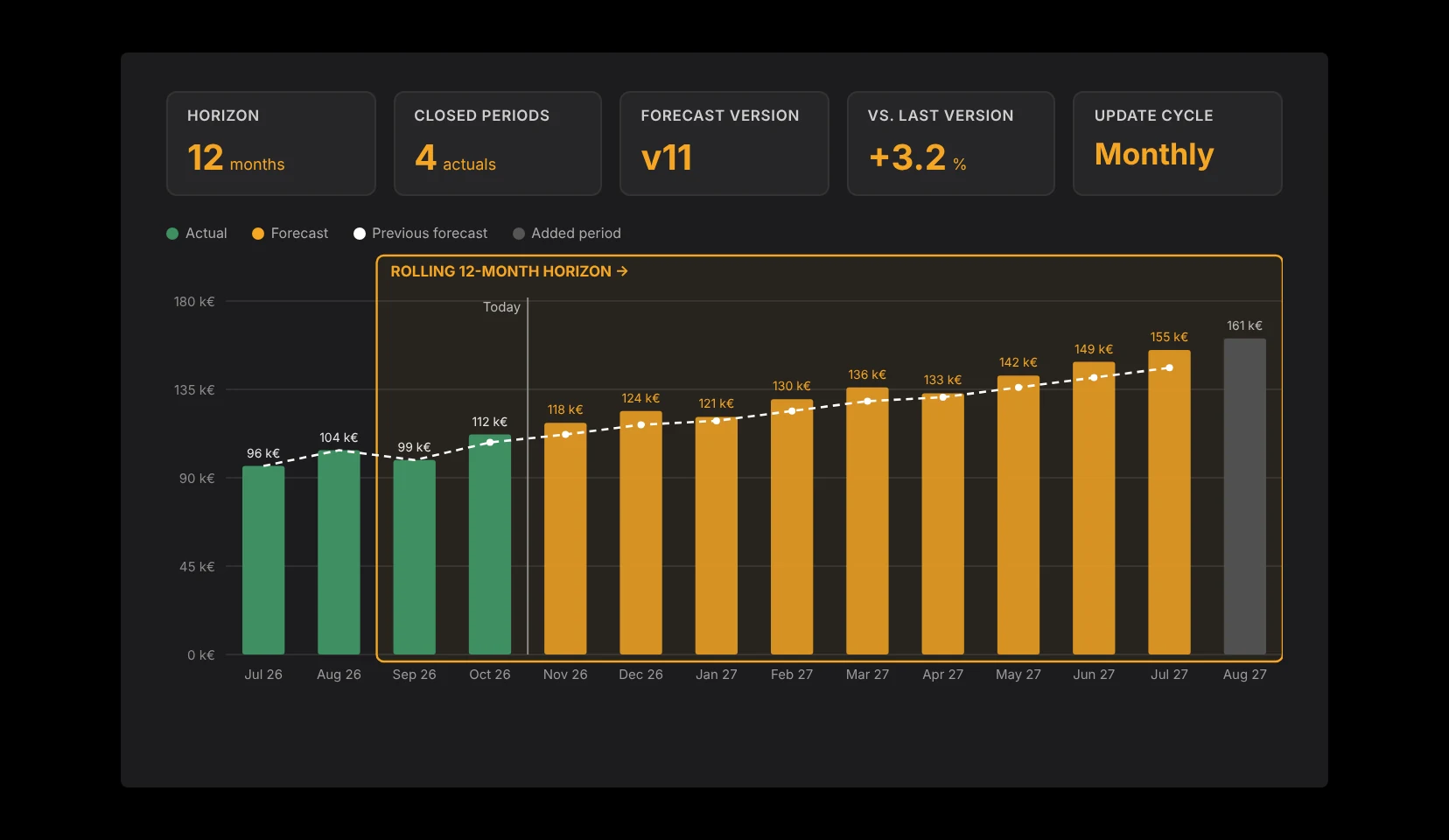
To build a rolling forecast, define a fixed look-ahead horizon, replace each closed period with reviewed actuals, and add a new period at the end. Each cycle, you update the operational assumptions behind revenue, headcount, costs and cash, instead of carrying the annual budget forward. The view ahead stays the same length, even as the fiscal year ends.
TL;DR
- A rolling forecast keeps the look-ahead horizon constant and updates expectations as new information arrives.
- Keep budget target, current forecast and actual results separate.
- Start with a few explainable drivers and clearly owned data sources.
- Save every forecast version, so you can explain later why a decision made sense at the time.
What is a rolling forecast?
A rolling forecast is a forecast that is updated on a regular cycle and always looks the same distance ahead, for example 12 months. When a month closes, its forecast is replaced with actuals and a new month is added at the end of the horizon.
This differs from a year-end forecast, which only covers the remaining months of the fiscal year. In October, a year-end forecast looks two months ahead. A 12-month rolling forecast still looks twelve months ahead. For decisions whose effects reach beyond year-end, such as a new hire or a larger investment, that difference matters.
Annual budget
- Key question: What do we want to achieve this fiscal year?
- Period: Fixed fiscal year
- Limitation: Does not reflect new expectations automatically
Year-end forecast
- Key question: Where will we land at year-end?
- Period: Remaining months of the fiscal year
- Limitation: The view ahead gets shorter every month
Rolling forecast
- Key question: What do we expect over the defined horizon?
- Period: Continuously extended
- Limitation: Needs recurring data review and assumption updates
Step 1: Choose the right horizon and cadence
Pick the horizon based on the decisions the forecast needs to support. Twelve months is a common starting point. Longer contracts or investments may need a longer horizon, while short-term payment decisions may need an additional, more detailed cash view.
Do not confuse horizon and cadence. You can update monthly and still look 12 or 18 months ahead. What matters is that the team knows both rules and does not renegotiate them every cycle.
- Name the decisions the forecast should support.
- Set the number of future periods.
- Choose a monthly or quarterly update cycle.
- Agree on a cut-off date for new information.
Step 2: Start from a reliable baseline
Before you extend the model, reconcile the most important starting values with the teams that own them. For each line, record the source, the period, the owner and whether it has been reviewed. That makes it visible whether a variance comes from the business or from a mapping error.
Watch the timing. A signed order, delivered work, an invoice and a payment are four different events. The forecast must reflect the transitions that matter for your business model without counting the same item twice.
- Review the last closed periods.
- Document open bookings and known corrections.
- Map cost centers and entities clearly.
- Flag incomplete data instead of silently estimating it.
Step 3: Plan with operational drivers
A driver is an explainable assumption that produces a financial number. For a services business, billable capacity and utilization may drive revenue. For recurring contracts, start dates, renewals and churn play a role. Only use relationships that fit your business.
Start with a handful of drivers your team can explain. A highly detailed model does not help if inputs are only maintained occasionally. Use historical patterns as a starting point, not as a law of nature, and note why a driver changed and which information triggered the change.
Step 4: Connect P&L and cash
A positive P&L forecast does not tell you when cash arrives. Payment terms, investments and financing flows need their own timing. Keep the P&L effect and the cash effect of each item separate, and check how a delayed project start affects revenue, utilization and payments.
ValueWorks supports this with connected headcount, expense, investment and revenue planning plus cash flow forecasting, based on data from your operational systems. Data mapping and a professional review of the model are still needed; an automated import does not replace them.
Step 5: Update without version chaos
Before each update, save the approved forecast as its own version. Then replace the closed period with reviewed actuals, update the open periods with new information and extend the horizon by one period.
- Save the previous forecast with a clear cut-off date.
- Replace closed periods with reconciled actuals.
- Only change assumptions where new information exists.
- Add the missing future period.
- Document major changes with cause and owner.
Step 6: Turn variances into decisions
Compare more than actuals against budget. Also compare actuals against the previous forecast, and the new forecast against the previous one. That separates target variance, forecast quality and genuinely new expectations.
A useful question in every review: what do we know today that we did not know at the last update? The answer should rest on concrete information. An unchanged target is not a reason for an unchanged forecast.
Why rolling forecasts still fail
Rolling forecasts do not only fail because of stale data. They also fail when teams report a target as the expected result, or hold back changes until they are certain. Separate wishes, confirmed information and reasoned assumptions.
Avoid false precision, too. Month-exact numbers look precise even when the underlying timing is uncertain. Work with a few clear scenarios instead, for example a base case, a later customer payment and a delayed hire, each changing only the relevant assumption.
FAQ
What is a rolling forecast in simple terms?
A regularly updated forecast with a constant look-ahead horizon. When a period closes, actuals replace the forecast and a new future period is added.
How is a rolling forecast different from a budget?
The budget describes the target for a fixed period; the rolling forecast describes the current expectation. Both can coexist and answer different management questions.
How often should a finance team update the forecast?
Monthly or quarterly. Choose based on how quickly decision-relevant assumptions change and how reliably new data arrives.
Can I start a rolling forecast in Excel?
Yes, a spreadsheet works for a clearly scoped start. Data review, calculations, ownership and versions still need to be organized clearly.
Does a rolling forecast replace cash planning?
No. Payment timing and balances need to be calculated separately and aligned with the operational plans.


